Below is the code to get the Daylight time .
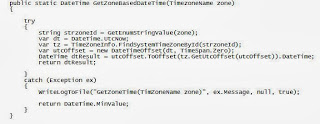 Method
public static DateTime GetZoneBasedDateTime(TimezoneName zone)
{
try
{
string strzoneId = GetEnumStringValue(zone);
var dt = DateTime.UtcNow;
var tz = TimeZoneInfo.FindSystemTimeZoneById(strzoneId);
var utcOffset = new DateTimeOffset(dt, TimeSpan.Zero);
DateTime dtResult = utcOffset.ToOffset(tz.GetUtcOffset(utcOffset)).DateTime;
return dtResult;
}
catch (Exception ex)
{
WriteLogToFile("GetZoneTime(TimZoneName zone)", ex.Message, null, true);
return DateTime.MinValue;
}
}
}
Enum
public enum TimezoneName
{
[StringValueAttribute("Singapore Standard Time")]
Asia = 1,
[StringValueAttribute("W. Europe Standard Time")]
Geneva = 2,
[StringValueAttribute("Central Standard Time")]
Hoston = 3,
[StringValueAttribute("None")]
None = 0
}
Method
public static DateTime GetZoneBasedDateTime(TimezoneName zone)
{
try
{
string strzoneId = GetEnumStringValue(zone);
var dt = DateTime.UtcNow;
var tz = TimeZoneInfo.FindSystemTimeZoneById(strzoneId);
var utcOffset = new DateTimeOffset(dt, TimeSpan.Zero);
DateTime dtResult = utcOffset.ToOffset(tz.GetUtcOffset(utcOffset)).DateTime;
return dtResult;
}
catch (Exception ex)
{
WriteLogToFile("GetZoneTime(TimZoneName zone)", ex.Message, null, true);
return DateTime.MinValue;
}
}
}
Enum
public enum TimezoneName
{
[StringValueAttribute("Singapore Standard Time")]
Asia = 1,
[StringValueAttribute("W. Europe Standard Time")]
Geneva = 2,
[StringValueAttribute("Central Standard Time")]
Hoston = 3,
[StringValueAttribute("None")]
None = 0
}
 Method
public static DateTime GetZoneBasedDateTime(TimezoneName zone)
{
try
{
string strzoneId = GetEnumStringValue(zone);
var dt = DateTime.UtcNow;
var tz = TimeZoneInfo.FindSystemTimeZoneById(strzoneId);
var utcOffset = new DateTimeOffset(dt, TimeSpan.Zero);
DateTime dtResult = utcOffset.ToOffset(tz.GetUtcOffset(utcOffset)).DateTime;
return dtResult;
}
catch (Exception ex)
{
WriteLogToFile("GetZoneTime(TimZoneName zone)", ex.Message, null, true);
return DateTime.MinValue;
}
}
}
Enum
public enum TimezoneName
{
[StringValueAttribute("Singapore Standard Time")]
Asia = 1,
[StringValueAttribute("W. Europe Standard Time")]
Geneva = 2,
[StringValueAttribute("Central Standard Time")]
Hoston = 3,
[StringValueAttribute("None")]
None = 0
}
Method
public static DateTime GetZoneBasedDateTime(TimezoneName zone)
{
try
{
string strzoneId = GetEnumStringValue(zone);
var dt = DateTime.UtcNow;
var tz = TimeZoneInfo.FindSystemTimeZoneById(strzoneId);
var utcOffset = new DateTimeOffset(dt, TimeSpan.Zero);
DateTime dtResult = utcOffset.ToOffset(tz.GetUtcOffset(utcOffset)).DateTime;
return dtResult;
}
catch (Exception ex)
{
WriteLogToFile("GetZoneTime(TimZoneName zone)", ex.Message, null, true);
return DateTime.MinValue;
}
}
}
Enum
public enum TimezoneName
{
[StringValueAttribute("Singapore Standard Time")]
Asia = 1,
[StringValueAttribute("W. Europe Standard Time")]
Geneva = 2,
[StringValueAttribute("Central Standard Time")]
Hoston = 3,
[StringValueAttribute("None")]
None = 0
}
